

EN, Language: English
Language
EN, Language: English
Help centre
Guides and answers for running your organisation on Anggota.
Membership numbers
Plenty of clubs give every member a number (something like BCT-733) and quote it on the phone, print it on the card and write it on the receipt. Anggota can issue those for you automatically, in your own format.
It is already on
New clubs start with member numbers switched on, and with a prefix already taken from your organisation's name, so the first person who joins gets a proper number without you having to set anything up.
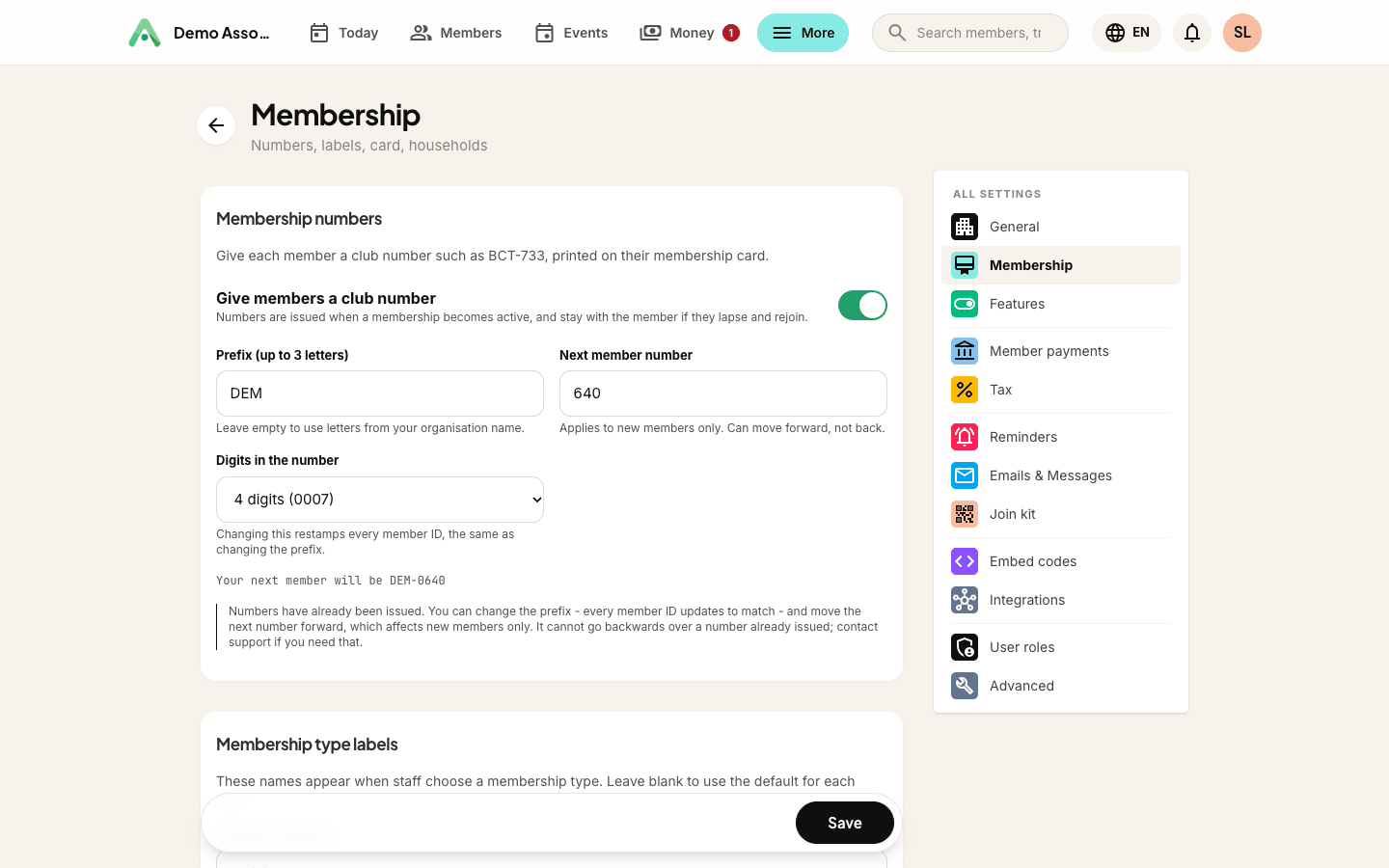
To check it or change it, open More → Settings → Membership. Give members a club number is the switch; untick it if your club does not use numbers at all.
- Prefix - up to three letters, pre-filled from your organisation's name (Bike Club Terbaik →
BCT, Harleyheads →HAR). - Start numbering from - where the count begins. Useful if you are carrying on from an existing paper register.
- Digits in the number - leading zeros, if you want them. No leading zeros gives
BCT-7; four digits givesBCT-0007.
Anggota shows a live example as you type, so you can see exactly what your members' numbers will look like before you save.
The number belongs to the person
Two rules make the number worth printing:
- It is issued once and never reissued. No two people ever share a number, even years apart.
- It survives a lapse. The number lives on the person's record, not on their membership, so someone who lets their membership go and rejoins two years later gets their old number back rather than a new one.
Numbers are issued as people join. Existing members are given theirs when you first switch the feature on.
Once numbers have been issued
The moment the first number goes out, the settings tighten up. Issued numbers end up printed on cards and quoted in emails, so they can't be casually rewritten after the fact. What you can still do:
- Change the prefix. Every member ID is restamped to match, so the scheme stays consistent. Anggota warns you first, because cards printed before today may show the old code. Anyone whose number you had hand-edited away from the standard format is left alone.
- Move the next number forward. This affects new members only. It cannot go backwards over a number already issued - ask support if you genuinely need that.
Finding someone by their number
The number is a search field like any other. Type BCT-733 into the search box and you land on that member. In the results list it is shown under their name in place of their email, because it is what your organisation actually calls them.
On the card and in a spreadsheet
- The number prints on the digital membership card, and the Ledger card layout leads with it in large type.
- It is a column in both the importer and the exporter, so you can bring an existing numbering scheme with you when you move to Anggota rather than starting again. Numbers you import are kept exactly as they are.
Tip: if you already have a paper or spreadsheet register, import your members with their existing numbers first, then set Start numbering from to one above your highest, so new joiners carry on the same sequence.
Still stuck? Reach your Anggota contact and we will walk you through it.
mailContact us