

EN, Language: English
Language
EN, Language: English
Help centre
Guides and answers for running your organisation on Anggota.
Levels and renewals
Membership levels are where you set out what you offer and what it costs, and the renewal rules on each level keep everyone current without you having to chase anyone.
Creating a level
- Open More → Membership Levels.
- Click New level.
- Give it a name (for example Individual or Gold), set the fee and choose the currency.
- Choose the renewal behaviour - see below.
- Choose which payment methods apply - online, offline (QR / bank transfer), or both.
- Save.
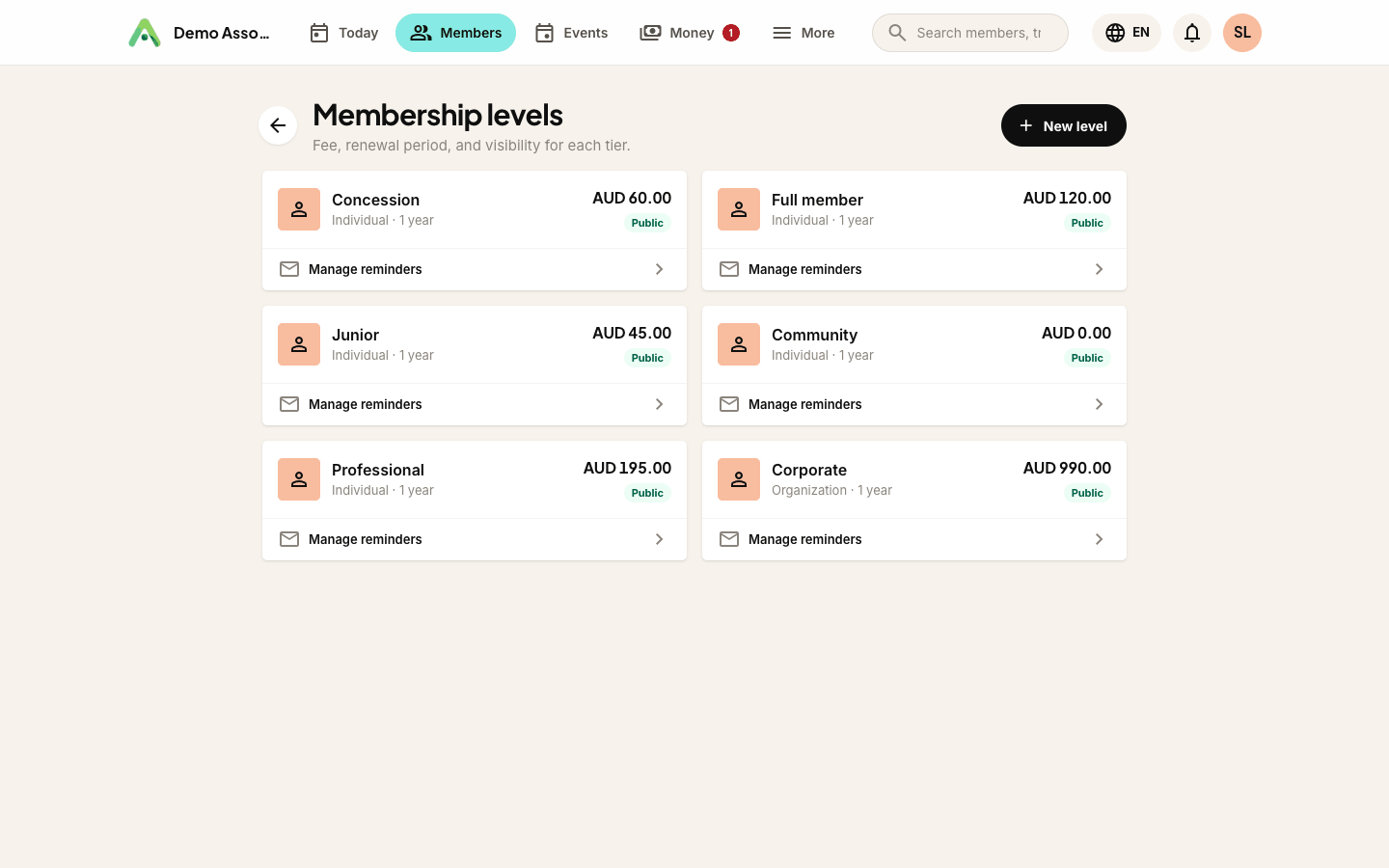
The currency is pre-filled to suit your organisation: a club working in Bahasa Indonesia sees IDR, one working in Malay sees MYR. It is only ever a starting suggestion - change it on any level and your choice stands.
Renewing or one-off
The Renewal setting decides whether the level ever comes round again:
| Setting | What happens |
|---|---|
| Renews on a schedule | The usual membership. Pick the period (a year, six months, and so on) and Anggota invoices and reminds at the end of each one |
| Does not renew (one-off payment) | Paid once and done. Members are never invoiced again, get no renewal reminders, and never lapse |
A one-off level suits a life membership, a joining-only category, or a one-time programme fee that should not turn into a subscription.
For a renewing level, Renewal every takes any number of Days, Weeks, Months or Years. You are not limited to a year or six months. A "6 months + 1 free" offer, for example, is simply a level that renews every 7 months, and a 12 + 2 deal renews every 14.
Switching an existing level between the two moves its current members with it. Anggota tells you how many before you save, and again afterwards. Switch to one-off and their renewal dates are cleared, so nobody is chased for a renewal you have just abolished. Switch to recurring and members without a date are given one a full period from today, because they are being asked to start renewing now and so the clock starts now. Members who already have a renewal date keep it.
When the renewal falls due
Most clubs renew each member a year after they joined. Some renew the whole membership together on one date, because the season opens in April, the AGM is in July or the books close in December. Renewal date on the level covers both:
| Setting | What happens |
|---|---|
| Each member's own anniversary | The usual arrangement. Someone joining on 14 March renews every 14 March |
| The same date for everyone | Pick the Renews on date and everybody on the level renews together, whenever they joined |
Two further settings only matter once you have picked a common date.
Carry forward (days before) answers the awkward question: what about somebody who joins three weeks before the renewal date? Set a carry-forward window and anyone joining inside it is covered until the following renewal, not the one about to land. Anggota spells out the effect as you type it (Members joining on or after 1 March will be covered until 1 April next year), worked out in your club's timezone, not in whatever timezone the person editing the level happens to be sitting in.
First payment decides what a mid-period joiner pays:
- Full fee, whenever they join - simple, and what most clubs do.
- Pro-rata for the part-year they get - they pay only for the days between joining and the next renewal.
Members who carry forward always pay the full fee. They are getting a whole period plus the tail of this one, so pro-rata does not apply to them.
Charging a setup fee on joining
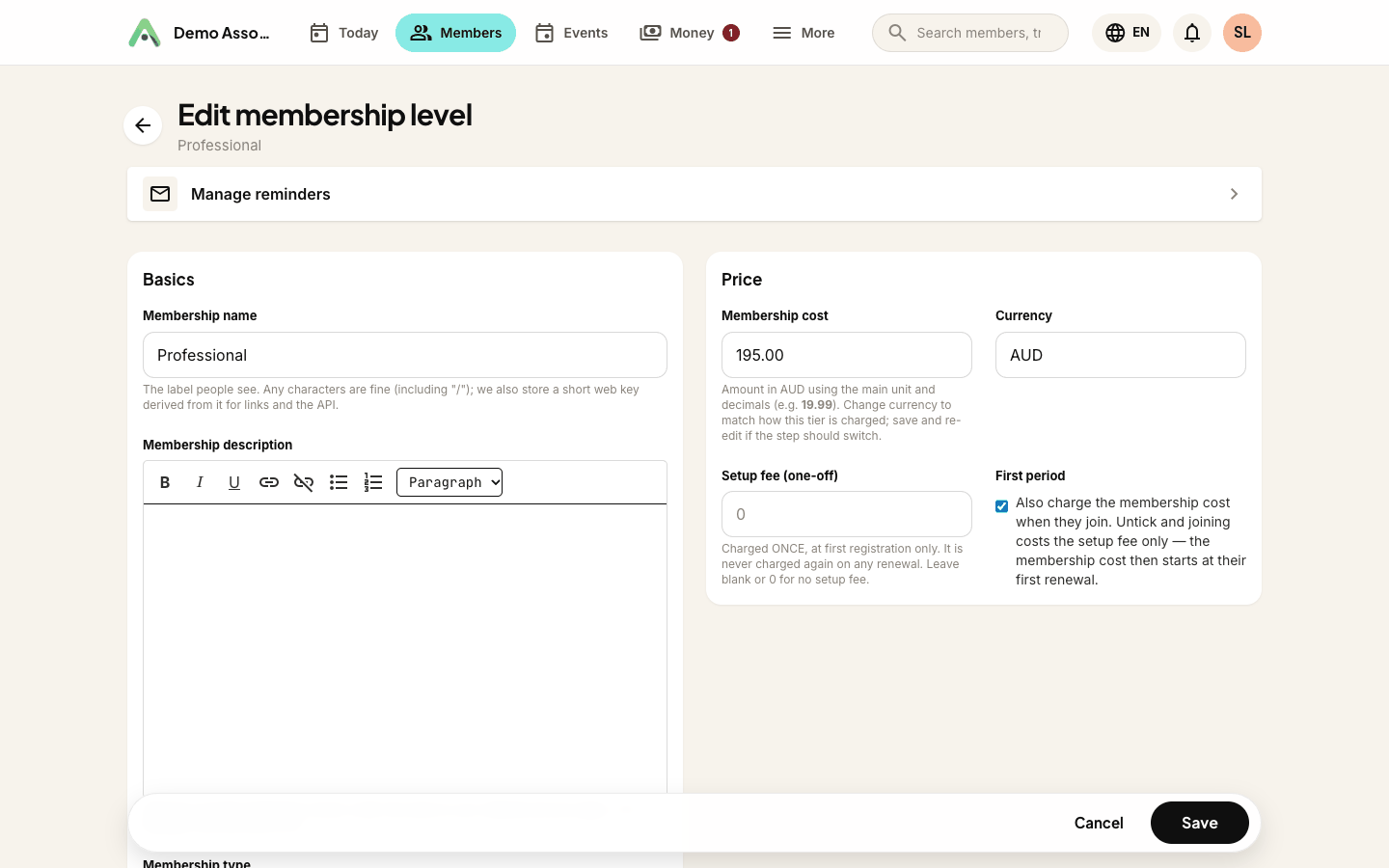
Some organisations charge a joining fee on top of the first year's membership. Set Setup fee (one-off) on the level and it is added to the very first invoice only, never to any renewal.
Underneath it, First period decides what else that first invoice carries:
- Ticked (the default) - joining costs the setup fee plus the membership fee, the usual arrangement.
- Unticked - joining costs the setup fee only, and the membership fee starts at their first renewal. Useful for a registration-then-subscribe model.
Your public join page and the checkout both show the split (the setup fee and the membership fee as separate lines, with the real total to pay today), so nobody meets a surprise at the last step.
How renewals work
When a membership nears its end date, Anggota reminds the member automatically and issues a renewal invoice. The member pays the same way they joined, their status stays Active, and their renewal date rolls forward a full period, with no spreadsheet or manual follow-up.
That is the default, and it is what most members get. A member can also opt into automatic renewal and have their card charged instead of being invoiced - see below.
The sweep runs once a day, and it does the whole cycle:
- Reminder - sent ahead of the renewal date, using your renewal reminder template.
- Invoice - raised when the renewal window opens and emailed to the member with a payment link. Each renewal gets exactly one invoice; the daily run never raises a second.
- Grace period - after the due date the membership shows as Overdue rather than dead, so a member who is a few days late is not locked out.
- Lapse - only once grace has run out. Nothing is deleted; the member simply shows as lapsed, and paying brings them straight back.
A member who pays a renewal invoice is renewed automatically the moment the payment lands. Nobody on your side has to mark anything.
Automatic renewal
A member can choose to have their card charged automatically instead of paying an invoice every year. The option appears as Renew my membership automatically on your join page.
It is opt-in and never pre-ticked, because agreeing to a recurring charge should be something a member did, not something they failed to untick. It also only appears at all if your club has Stripe or PayPal connected. Xendit, DOKU and QRIS cannot hold a recurring authority, so on those gateways the option is hidden rather than offered and then quietly ignored.
The level's renewal period matters too. PayPal can charge at most once a year apart, and Stripe at most three years apart. On a level that renews less often than your connected gateway allows (a 14-month level with only PayPal connected, say), the option is not shown, and those members renew by invoice in the usual way. If you have both connected, Stripe is used first.
Once a member has it on:
- Their card is charged once each period, on the renewal date, with no invoice for them to go and pay.
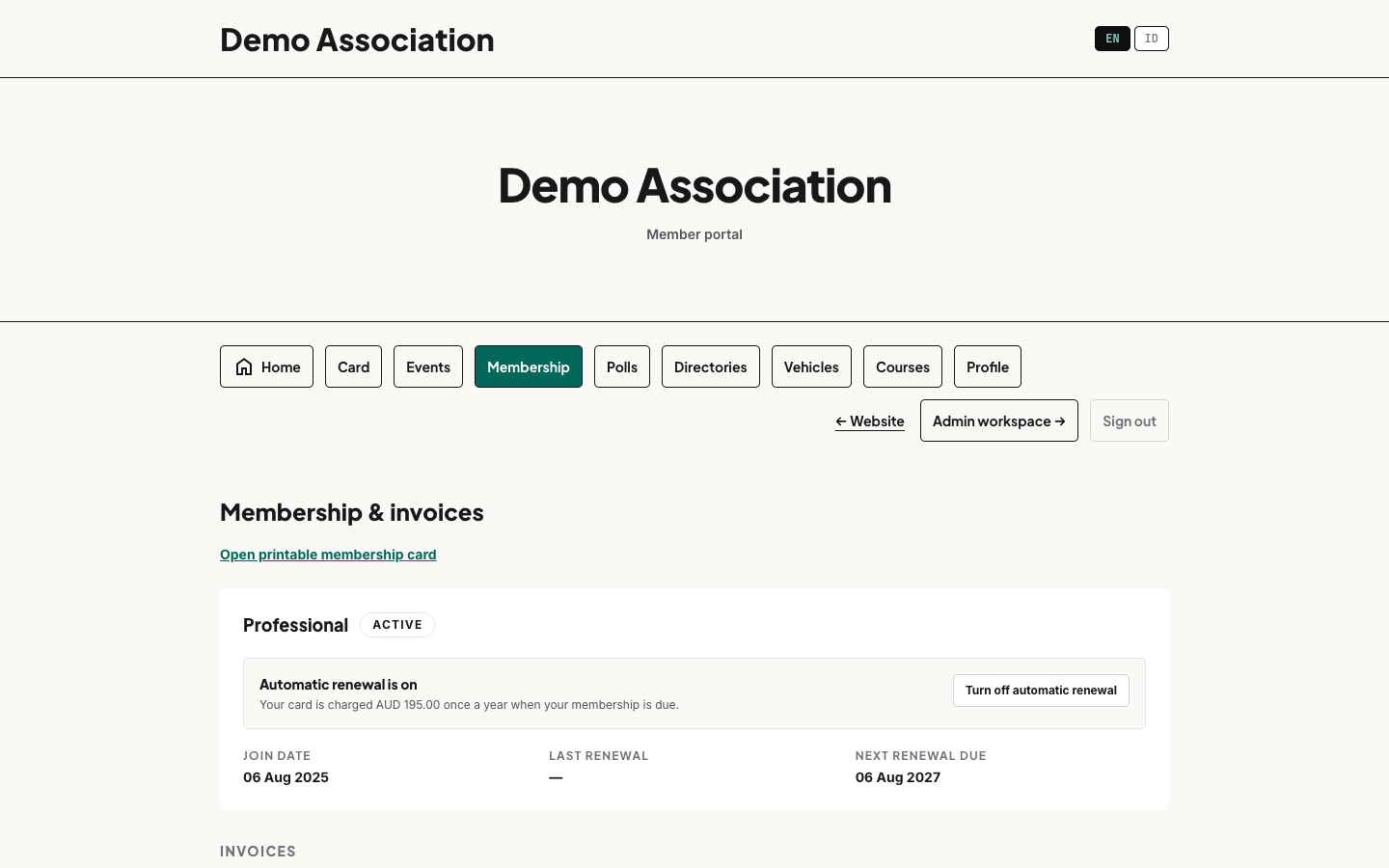
- Their membership page in the portal shows Automatic renewal is on, with the amount, and a button to turn it off.
- You can stop it for them from their member record with Stop auto-renew, for the member who rings the club rather than hunting for the switch themselves.
Turning it off does not end the membership. They stay a member until the current period runs out. After that they are invoiced the ordinary way, like everybody else.
When a charge fails. If an automatic charge bounces, the member is sent the Membership Payment Failed email, so they can update their card before the membership lapses. Their membership stays active while Stripe or PayPal retries the card, and the email goes out on each failed attempt. If the provider gives up, automatic renewal is switched off and the member falls back to an ordinary renewal invoice. You can edit the wording like any other email template.
If the payment provider cannot be reached at the moment somebody cancels, nothing changes and they are asked to try again. The switch never half-throws.
Example
A club offers Individual membership at Rp 150.000 per year, payable by QRIS or bank transfer. A member joins in March; the following March, Anggota emails a renewal reminder with a payment link. When they pay, their membership rolls over for another year.
Public levels
Mark a level public to have it appear on your join page so new members can choose it themselves. Keep a level private if it is invitation-only.
Next: set up how you take payment.
Payment options that match reality
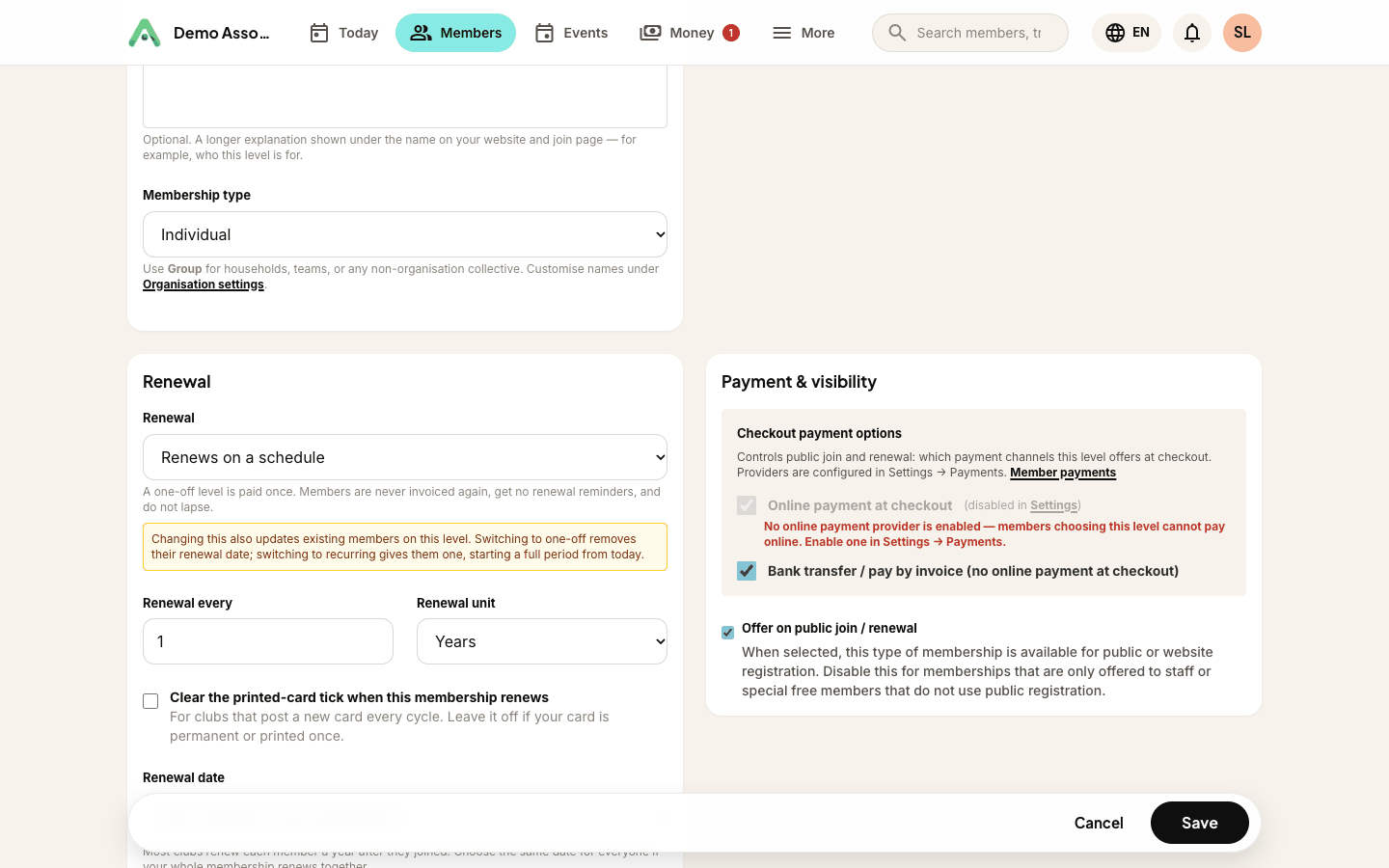
Each level lets you choose how people can pay for it - card, PayPal, bank transfer, QR, and so on. You will only be able to tick the methods your organisation has actually set up: anything you haven't configured is shown greyed out, with a note pointing to More → Settings where you can switch it on.
That way a level can never advertise a payment method that would fail at checkout. Turn a gateway on in Settings and it becomes selectable on every level immediately.
Describing a level properly
The description field is a full rich-text editor - headings, bold, lists and links. What you write appears on your Anggota website and in the join widgets on your own site, where longer descriptions get a View details toggle so the cards stay tidy.
Still stuck? Reach your Anggota contact and we will walk you through it.
mailContact us