

EN, Language: English
Language
EN, Language: English
Help centre
Guides and answers for running your organisation on Anggota.
Email templates
Anggota sends your members a handful of emails automatically (a welcome when they join, a reminder before their membership is due, a receipt when they pay, a confirmation when they register for an event), and you control the wording of every one of them.
Where to find them
Open More → Emails & messages. Each row is a template Anggota sends at a particular moment, such as Membership Welcome, Membership Renewal Reminder, Payment Receipt and Registration Confirmation.
Editing a template
- Open a template to edit its subject and body.
- Write in plain language - no code needed.
- Drop in merge tags wherever you want a personal detail. A tag looks like
{{FIRST_NAME}}, and Anggota swaps it for the real value when the email is sent.
Each template only offers the tags that make sense for what it is about, so you never have to guess. Pick from the menu and the tag is inserted for you.
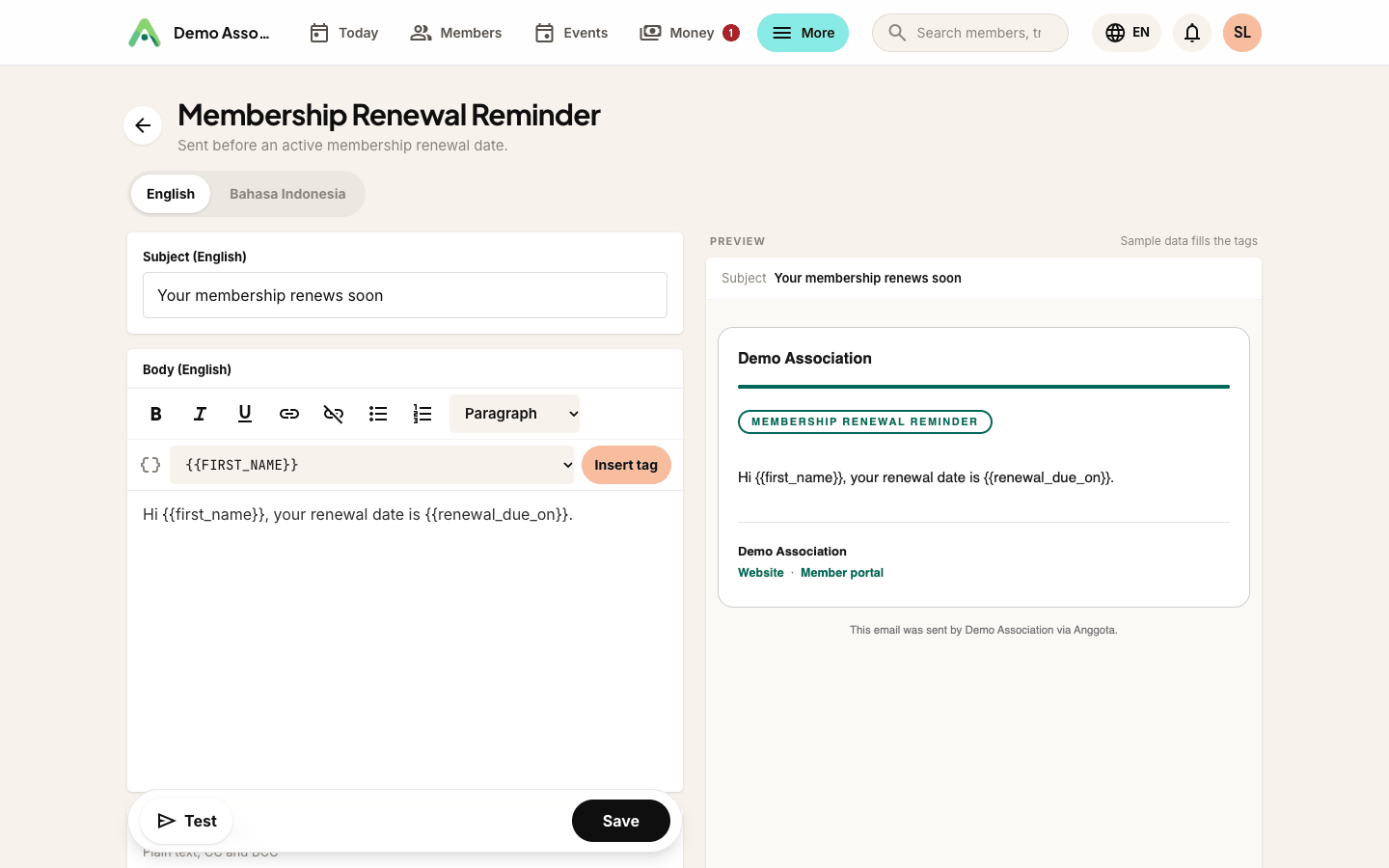
- Membership emails (welcome, renewal reminder, renewal confirmed) carry member and membership tags -
{{FIRST_NAME}},{{MEMBERSHIP_LEVEL_NAME}},{{MEMBERSHIP_STATUS}},{{MEMBERSHIP_RENEWAL_DUE}}, and on the reminder{{DAYS_UNTIL_RENEWAL}}so the email can say exactly how long a member has left. - Membership Payment Failed goes to a member when an automatic renewal charge on their card bounces, so they can fix the card before the membership lapses. As well as the membership tags it carries
{{PAYMENT_AMOUNT}},{{PAYMENT_PROVIDER}}(Stripe or PayPal) and{{PAYMENT_ATTEMPT}}. See automatic renewal. - Event registration confirmation carries the event details -
{{EVENT_NAME}},{{EVENT_DATE}},{{EVENT_START_TIME}},{{EVENT_LOCATION}},{{TICKET_NAME}}- plus{{EVENT_DETAILS}}(your event's detail fields) and{{REGISTRATION_ANSWERS}}(what this person answered when they registered). - Payment receipts and invoice emails carry
{{INVOICE_NUMBER}},{{INVOICE_TOTAL}},{{INVOICE_ITEMS}}and the like. - Shop order emails (when the shop is on) carry the order total, shipping method and address.
Tip: use Send test to email a copy to yourself first. Test-sends fill the tags with sample values, so you see exactly how the message will read before a real member gets it.
Copying someone in on every send
Each template has its own CC and BCC fields. Anything you put there is copied on every send of that template, so there's no rule to build or reminder to set.
- CC - the member can see these addresses.
- BCC - copied silently; the member never sees them.
Separate several addresses with commas: [email protected], [email protected]. Up to 10 addresses per field; for anything bigger you want a mailing list rather than a template.
Typical uses: BCC your treasurer on every payment receipt, CC events@ on every event confirmation so the whole team sees the thread, or BCC an archive address to keep a copy of everything the organisation sends.
Only real, deliverable addresses are accepted. Anggota checks each one as you save and tells you exactly which entry it could not use.
A shared footer
Set a common footer once (your contact details and a sign-off) and it appears at the bottom of every template, so you never have to repeat it.
Next: see how payments trigger receipts in payment options.
Who replies land with
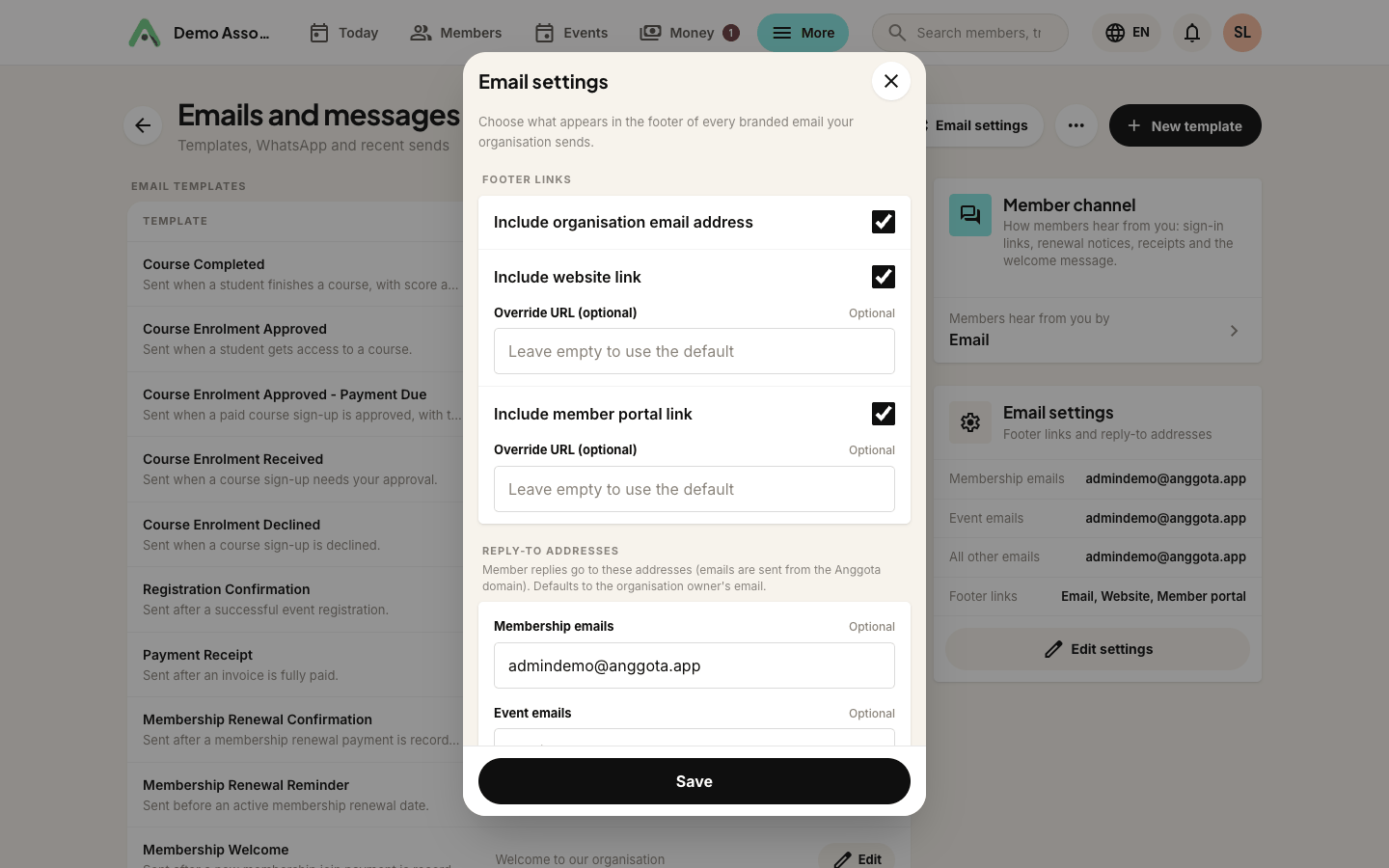
Emails are sent from Anggota's mail servers so they arrive reliably, but when a member hits Reply the message should reach you, not us. Set that with the Email settings button at the top of Emails & messages, where you can give a different reply-to address for each kind of email:
- Membership emails - welcomes, renewal notices, receipts for a membership
- Event emails - confirmations and reminders
- Other emails - everything else
Each starts out as the address of whoever created the organisation, so replies already reach a real person. Point them at members@, events@ and info@ if your organisation splits its inbox that way.
Links in the editor
The editor toolbar includes a link button. Select the words you want to turn into a link, click it, and enter the address. Click a link again to edit or remove it. The same toolbar appears everywhere Anggota offers rich text, including event and membership-level descriptions.
Still stuck? Reach your Anggota contact and we will walk you through it.
mailContact us