

EN, Language: English
Language
EN, Language: English
Help centre
Guides and answers for running your organisation on Anggota.
Saldo Anggota
Coming soon
This feature is built and being finalised - it is not switched on for organisations yet. The page is here so you can see what is coming and plan for it. We will let you know when it goes live.
Saldo Anggota is your prepaid balance for messages that cost money to send. Today that means WhatsApp; anything Anggota charges per message in future will draw on the same balance.
Email is free and always will be. Saldo only ever pays for the paid channels.
Counted in messages, not rupiah
Your balance is shown as messages remaining, because that is the number you can actually act on. "142 messages remaining" tells you whether you can send your renewal run. A rupiah figure would make you do arithmetic first.
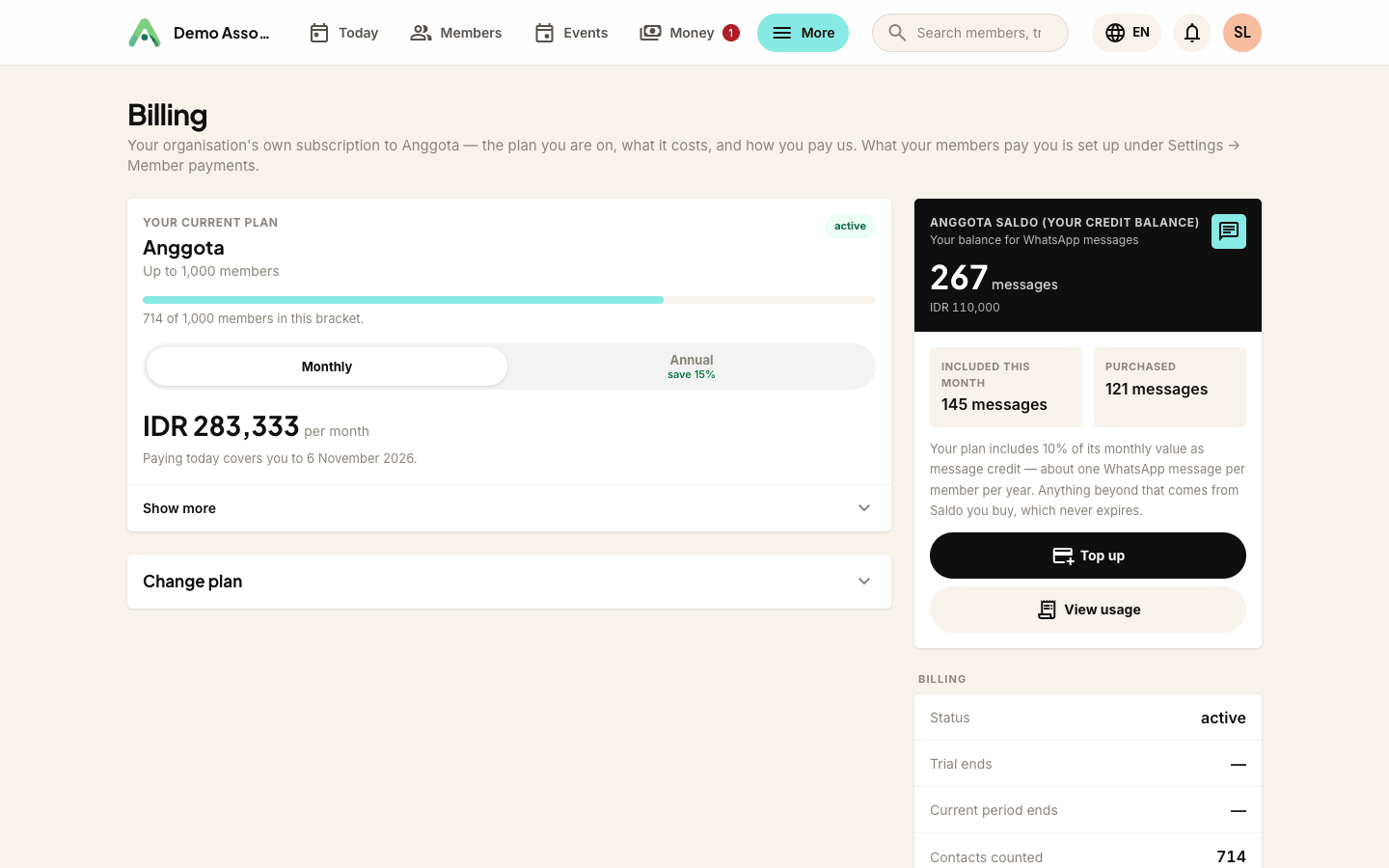
You will find it in two places: on your Billing & Saldo page in full, and as a small panel on your Today screen so you can see at a glance whether you are running low.
Two kinds of Saldo
Included comes with your plan and refreshes on the first of every month. It is worth about one WhatsApp message per member per year, which works out the same for a club of 100 members as for one of 10,000. It does not roll over - anything unused at the end of the month goes, and a fresh allowance arrives.
Purchased is Saldo you have bought. It never expires, and it is only touched once your included allowance for the month is used up. So you are never spending money while free allowance sits there unused.
Topping up
Click Top up on the Billing & Saldo page. Pick one of the amounts: each card shows roughly how many WhatsApp messages it buys. Then choose how to pay and click Buy now.
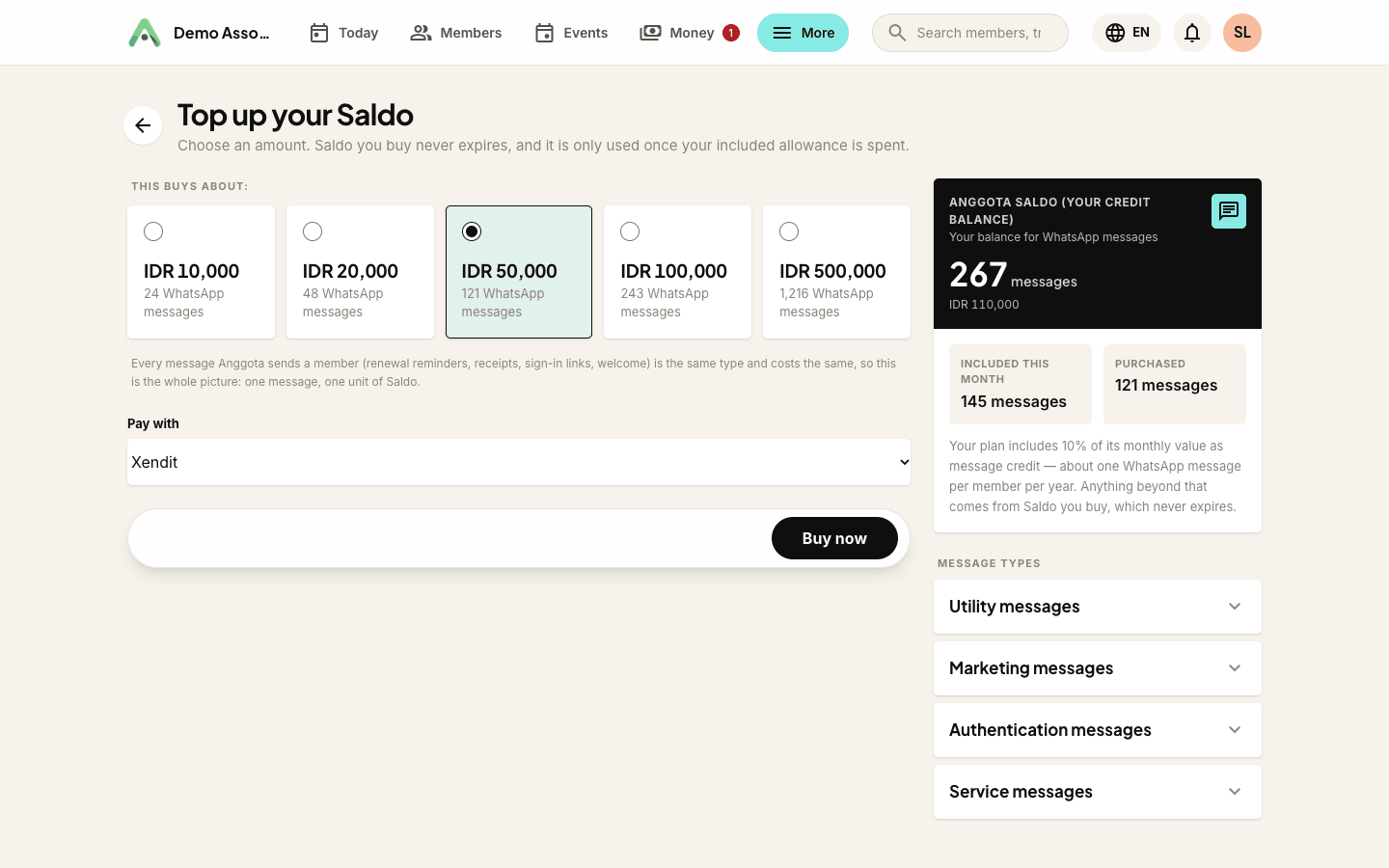
You will see three kinds of message, because Meta charges different rates for each:
- Utility messages follow up on something a member already has or did - a renewal reminder, a receipt, an event reminder. This is what most of your messages will be, and it is the cheapest.
- Authentication messages are one-time sign-in codes. Priced separately by Meta and usually the dearest.
- Marketing messages are promotions and invitations not tied to an existing transaction. They cost more and need separate permission from the member.
Pay the way you already pay for Anggota. Purchased Saldo lands in your balance as soon as the payment clears.
Running low
Anggota emails you when your balance is getting low, and again if it reaches zero. Both emails are editable under More → Emails & messages, like every other email Anggota sends.
Reaching zero is not an outage. Reminders keep going out by email, exactly as they do now. The only thing you lose is the WhatsApp upgrade, and topping up switches it straight back on.
Seeing where it went
View usage on the Billing & Saldo page shows every movement on your balance - what was sent, which kind of message it was, what it cost, and what the balance was afterwards. This is the one screen that speaks in rupiah, because it is the one where you are checking the money.
If a message fails to arrive, the Saldo for it is returned automatically. You are only ever charged for messages that were actually delivered.
Questions people ask
Does unused Saldo expire? Your monthly included allowance does, at the end of each month. Saldo you have bought does not - it stays until you spend it.
What happens if I never top up? You use your included allowance each month and reminders go by email once it is gone. That is a perfectly reasonable way to run, and it costs you nothing extra.
Can I get a refund on unused Saldo? It is credit towards messages rather than a deposit, so it is not refundable as cash. Get in touch if your circumstances change and we will sort something out.
Can I stop Anggota spending it without warning? Saldo is only ever spent on the channels you have switched on yourself under More → Emails & messages. With all three off, nothing is spent.
Still stuck? Reach your Anggota contact and we will walk you through it.
mailContact us